### Summary
- Puts back `EventSink.SocketConnect`.
- Reverts networking change to push the networking to a separate thread.
- Reverts changes to the firewall by removing the firewall queue.
- Fixes listeners not shutting down with the server.
- Fixes race condition causing connections to get stuck even after they are disposed.

> [!NOTE]
> **Developer Note**
> Networking has been reverted back to using the main thread instead of a background thread. This alleviated complexity and the requirement for concurrent queues all over the place.
### Summary
Updates the serialization strategy to use `MemoryMappedFile` instead of thick buffers. This has the benefit of being on-par with the current implementation (based on hardware/OS), however won't incur the double-memory issue.

> [!Important]
> **Developer Note**
> The `BinaryFileWriter` and `BinaryFileReader` has been removed in favor of `MemoryMapFileWriter` and `UnmanagedDataReader`
> [!Note]
> **Developer Note**
> Now developers will only need to build/run the Application project instead of everything.
> When adding new projects, make sure to:
> 1. Add a reference to that project in the Application project.
> 2. Add the dll file to the Distribution/Data/assemblies.json file

### Summary
- Adds an application project
- Consolidates process restarts to use `Core.Kill(true)`
- Removes some old messaging, for example processor optimization
- Fixes missing build cleanup
## Breaking Changes
* The Firewall and IP Limiter have been rewritten. Please read the notes carefully!
* `TcpServer.Instances` moved back to `NetState.Instances` - sorry - it was stupid to move it to begin with.

> [!Note]
> Sockets that fail the IP Limiter or Firewall will be immediately and forcibly disconnected.
> This means they will be stuck at "Verifying account..." if it was a real client.

### Summary
- Removes firewall wildcard support.
- Removes `AccessRestrictions`.
- Moves Firewall/IPLimiter to the core.
- Moves `TcpServer` to its own thread.
- Removes the `SocketConnect` and `SocketDisconnect` event sinks.
- Moves `Instances` back to `NetState.Instances`.
- Fixes a long standing bug with bad handling of duplicate listener addresses.

#### Firewall
The firewall has been completely rewritten. There is now an "Admin Firewall" which saves to the config file. Secondarily, there is an internal firewall used exclusively by the TcpServer while processing sockets. The Admin firewall mirrors it's additions/deletions to the internal firewall by adding requests to a queue.

> [!IMPORTANT]
> **Wildcard firewall entries, such as `X`, `*`, `?` are not allowed.**
> **Ranges in between IP classes or sextets are not allowed.**
> **Please make sure to use one of the following:**
> * IP Address - `192.168.1.1`
> * CIDR - `192.168.1.0/24`
> * Range - `192.168.1.1-192.168.1.100`

#### IP Limiter
The IP Limiter has been completely rewritten. The available configurations are:
```json
"ipLimiter.enable": "True",
"ipLimiter.maxConnectionsPerIP": 10,
"ipLimiter.clearConnectionAttemptsDuration": "00:00:00:10",
"ipLimiter.clearThrottledDuration": "00:00:02:00",
```

The IP Limiter is set up to prevent spamming connections from the same IP. Every time an IP connects, it is added to a connection list. After 10 attempts, the IP is added to the throttle list. To keep the system fast, the connection list is entirely wiped every 10 seconds, and the throttle list is entirely wiped every 2 minutes.
## MAJOR CHANGE

Added a champion title system to facilitate the existing champion titles. This should make it easier to extend or create other related game content. Champion titles will be saved in a folder called _ChampionTitles_.

### Motivation

The motivation to refactor was two-folder, but mostly related to performance in two ways.
First, every player had a ChampionTitleInfo object with an array of ChamptionTitleInfo. We want to eliminate the need for this information unless a player actually uses it. This should save a considerable amount of memory.

Second, to facilitate the atrophy mechanic, the champion titles would run atrophy post-world save, adding to the time that the server is frozen. Eliminating this post-world save side effect unlocks our ability to further optimize the world save process since there are no direct side effects.


### Bugs fixed

- [X] Fixed titles getting cut off on the paperdoll
- [X] Fixed champion title not displaying overhead (OPL)

### Screenshots
<img width="216" alt="image" src="https://github.com/modernuo/ModernUO/assets/3953314/8916f895-8d68-4fb0-892e-108a0c43be90">
### Changes
* Implements an AfterSerialize method that is executed synchronously.
* Removes `BeforeSerialize` support since it was dangerous in its current implementation.
* Moves PlayerMobile kill/virtual decay to AfterSerialize.
* Adds kill decay to after Deserialize.
**Only one functional change**
* Fixes a bug in LogFactory where `Warning` is being logged as `Information`

Non-functional changes:
* Updates/Fixes copyright headers
* Removes namespace scopes for core files.

View with [whitespace off](https://github.com/modernuo/ModernUO/pull/1187/files?w=1).
* Changes reading multi.mul/multi.idx so it is loaded entirely during bootup.
* Fixes finding files in Linux.
* Fixes handling HS format.
* Removes verdata support.

ModernUO will still have issues if there is a multi.mul that is pre-HS loaded when it detects a client that is 7.0.9+.
* Now reads Prof.txt to get the professions
* The templated professions are based on profession `TrueName`
* Adds missing starting equipment
* Implements gargish starting equipment
* Consolidates some of the code
* Moves TC stuff to the TC file.
* Fixes some starting equipment that was wrong.

Note:
* Implementing the original T2A professions is possible on the client side, but requires moving the old clilocs to the current clilocs file. In the current file the entries are blank.
* Using the original LBR professions (they match AOS but without necromancy/chivalry) is kind of confusing because the profession indexes are ripped out of the UOTD/UOR ones and have non-sequential indexes. This will probably cause confusion and people will get no templated items when they select the wrong profession.
## Adds Auto Archiving
Backups are archived once an hour, day, and month. Archives older than 60 days are pruned automatically.

_Note: Automatic pruning is off by default_

### Archive compression format
The following formats are supported:
* Zstd (The fastest with best compression ratio)
* GZip
* Zip
* None (Tar)

_Note: By default archives use [zstandard](http://facebook.github.io/zstd/) format.
The archive format can be changed in modernuo.json `autoArchive.compressionFormat`_

### Restoring world from archive
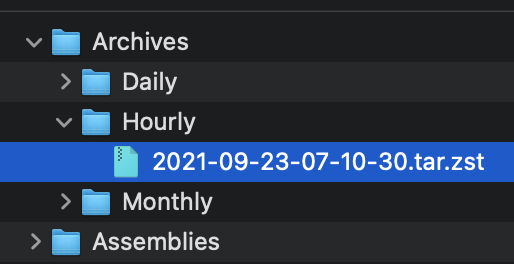
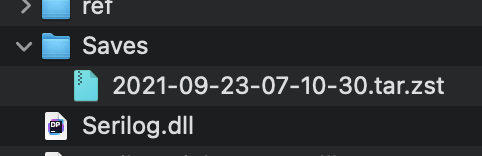
Move the archive to the Saves folder (tar.zst file). On startup the server will extract the file and restore the latest save. See pictures below.

### Manually extracting an archives
#### Windows
* Use the latest version of [7-zip w/ ZStandard](https://github.com/mcmilk/7-Zip-zstd/releases/latest)
  1. Extract the `.tar.zst` file.
  2. Extract the `.tar` file. (Yes you have to do it in two steps)
* On Windows 10 you can use the command line. `zstd.exe` is in the Assemblies folder after building ModernUO.
  1. `tar --use-compress-program "Distribution\Assemblies\zstd.exe -d" -xvf "Archives\Hourly\archivefile.tar.zst" -C "path to where you want to extract it"`
#### Mac
* Install [Keka](https://www.keka.io)
  1. Drop the .tar.zst onto the keka interface.
#### Linux
  1. Install zstd from a package manager
  2. Run `tar -I zstd -xvf "Archives\Hourly\archivefile.tar.zst" -C "path to where you want to extract it"`

### Other changes
* Changes Autosave to occur at the same time no matter when the server is booted.
* Adds `[SaveFrequency <delay> [warning]`command to set save frequency and warning frequency in-game.
* Adds support for time zones that are configurable. The system timezone can also be manually configured. Check `TimeZoneHandler.cs` for details.

<img width="257" alt="Screen Shot 2021-09-22 at 11 23 18 PM" src="https://user-images.githubusercontent.com/3953314/134464929-a5bf3cd8-2ef0-4476-a9ad-71d0816a19ac.png">
<img width="241" alt="Screen Shot 2021-09-22 at 11 23 39 PM" src="https://user-images.githubusercontent.com/3953314/134464945-5f6f96dc-3d1e-434d-8256-5c6b3705e786.png">
<img width="836" alt="Screen Shot 2021-09-22 at 11 34 39 PM" src="https://user-images.githubusercontent.com/3953314/134464957-625e57f2-ef47-4ca1-a0a7-cd40c9b6539c.png">
<img width="631" alt="Screen Shot 2021-09-22 at 11 34 50 PM" src="https://user-images.githubusercontent.com/3953314/134464969-b2d65c0d-f8f5-497a-a832-5d805e8e0b22.png">
* `AssemblyHandler.Assemblies` will now only contain assemblies listed in `assemblies.json`
* `assemblies.json` has been updated to only contain asssemblies directly loaded by the server. Namely, only `UOContent.dll`.
  * Specifically assemblies loaded by assemblies.json are subject to check for `Configure` and `Initialize` methods.
* `modernuo.json` now has a new property called `assemblyDirectories`. This will be automatically set to `Distribution/Assemblies` (absolute path on your machine).
  * You can add more directories to this list.
* All assemblies in assemblies.json _AND_ dependents of any assembly will be searched for in the directories specified by `assemblyDirectories`.
### Changes/Fixes:
* Adds timer pooling.
* Allows pool to be configurable in ModernUO.json
* Pool replenishes itself asynchronously if depleted.
* Fixes an issue with barkeeps and town criers
* Fixes an issue with incognito buff icons not being removed
* Fixes an issue with polymorph name mod not being removed
* Fixes several places where timers go on forever even after an object is deleted, keeping a reference (memory leak)
* Eliminates the timer for MiningCart altogether.
* Deletes `AcidSlime` since it is a duplicate of `PoolOfAcid`
* Fixes HonorableExecution and standardizes the code for other Bushido moves.

## Changes to the Timer API:
```cs
public class Timer
{
  // Creates a timer that will be returned to the pool once execution stops.
  public static void StartTimer(Action callback);
  public static void StartTimer(TimeSpan delay, Action callback);
  public static void StartTimer(TimeSpan delay, TimeSpan interval, Action callback);
  public static void StartTimer(TimeSpan interval, int count, Action callback);
  public static void StartTimer(TimeSpan delay, TimeSpan interval, int count, Action callback);

  // Creates a timer and returns a token for more control. Requires manual cancellation in order for the timer to be returned to the pool.
  // If the token is dereferenced, the timer will be dereferenced too. While not returning a timer to the pool is not considered hazardous, it does defeat the purpose of pooled timers.
  public static void StartTimer(Action callback, out TimerExecutionToken token);
  public static void StartTimer(TimeSpan delay, Action callback, out TimerExecutionToken token);
  public static void StartTimer(TimeSpan delay, TimeSpan interval, Action callback, out TimerExecutionToken token);
  public static void StartTimer(TimeSpan interval, int count, Action callback, out TimerExecutionToken token);
  public static void StartTimer(TimeSpan delay, TimeSpan interval, int count, Action callback, out TimerExecutionToken token);

  // If you aren't sure how to use the API above, or you don't care about performance, then you can use the old RunUO Timer.DelayCall
  public static DelayCallTimer DelayCall(Action callback);
  public static DelayCallTimer DelayCall(TimeSpan delay, Action callback);
  public static DelayCallTimer DelayCall(TimeSpan delay, TimeSpan interval, Action callback);
  public static DelayCallTimer DelayCall(TimeSpan interval, int count, Action callback);
  public static DelayCallTimer DelayCall(TimeSpan delay, TimeSpan interval, int count, Action callback);
}

public struct TimerExecutionToken
{
  public bool Running { get; }
  public int Index { get; }
  public int RemainingCount { get; }
  public DateTime Next { get; }
}
```

## When to use `TimerExecutionToken`?
Use tokens when you want to gain the performance benefit of using a pooled timer, but you need one of the following:
* Access to the next time the timer will tick:`token.Next`
* Access to which interval, how many intervals there are, or how many are remaining: `token.Index`, `token.Count`, and `token.RemainingCount`
* Stop a timer manually.
* Determine if the timer is running: `timer.Running`
* See notes below about requirements for using tokens!

## Notes about using the TimerExecutionToken:
When you opt-in to receive a token, you must call `Cancel()` to return the timer. This can be done inside of the callback, or outside of the callback at any time.
If this is not called and your timer is an infinite interval, then you will create a potential memory leak, or null pointer exception in your callback.
If the timer ends and is stopped, but cancel is not called, then the timer will never return to the pool and stay referenced until the token is deleted or cancel is called. (Memory leak)

## Is this thread safe?
No. The ModernUO timer system is not thread safe at all. If you require a thread safe timer system, contact me and I'll help adapt this system. Keep in mind that there is a massive performance hit to make this thread safe when there are literally no use cases for it.

If you need to synchronize execution, meaning you want to execute code from another thread on the core thread. Let's say you have a discord bot that is pushing commands to the game server. Then use `EventLoopContext.Post(SendOrPostCallback callback, object state);`.
- Adds `[ManualDirtyChecking]` for anyone that adds it themselves.
- Adds detection of `[Serializable]` and `[ManualDirtyChecking]` at startup to help identify scripts that need migration.
Some architectures (specifically docker) have an issue with tick count and high precision timing.
This handles those weird cases so instead of outright freezing, you may get timer precision loss.