### Summary

Fixes a few minor issues with timers:
- Timer.Delay and Timer.Interval was not reflecting the actual tick time (aligned to the next 8ms)
- Negative delay values were causing a crash when DateTime.Now - delay was below DateTime.MinValue
- Timer.Next now reflects the correct wall clock tick time based on the adjusted Delay.
- Timer.Next is not assigned when the timer is started. This was important for timers that were created, but started later.
### Summary

- Fixes timer intervals not continuing
- Fixes `Timer.Index` being off by 1. Should start at 0 for the first OnTick
- Simplifies Gift of Renewal end check
- Fixes force of nature not applying at the proper time and simplifies the timer logic.
* Fixes an edge case where a check to see if a timer was being executed resulted in it not being properly detached on stop. Fixed this by changing how we determine what timer is currently being executed.
* Adds execution count to #DEBUG_TIMERS so shards can get notified (rudimentarily for now) about sequentially executing long chains of timers.

Unfortunately, for now, there is no good option when it comes to executing timers. If we execute let's say 500, and defer the rest, that makes all timers effectively 8ms off until it "catches up". Depending on the shard, that may never happen.
**Only one functional change**
* Fixes a bug in LogFactory where `Warning` is being logged as `Information`

Non-functional changes:
* Updates/Fixes copyright headers
* Removes namespace scopes for core files.

View with [whitespace off](https://github.com/modernuo/ModernUO/pull/1187/files?w=1).
## Adds Auto Archiving
Backups are archived once an hour, day, and month. Archives older than 60 days are pruned automatically.

_Note: Automatic pruning is off by default_

### Archive compression format
The following formats are supported:
* Zstd (The fastest with best compression ratio)
* GZip
* Zip
* None (Tar)

_Note: By default archives use [zstandard](http://facebook.github.io/zstd/) format.
The archive format can be changed in modernuo.json `autoArchive.compressionFormat`_

### Restoring world from archive
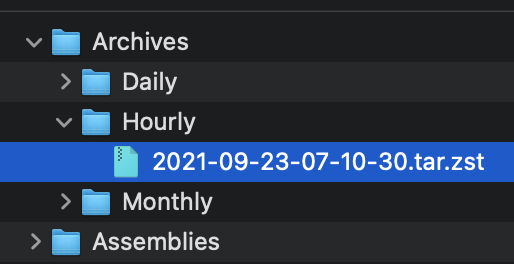
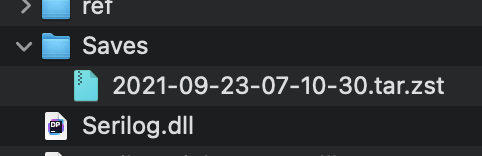
Move the archive to the Saves folder (tar.zst file). On startup the server will extract the file and restore the latest save. See pictures below.

### Manually extracting an archives
#### Windows
* Use the latest version of [7-zip w/ ZStandard](https://github.com/mcmilk/7-Zip-zstd/releases/latest)
  1. Extract the `.tar.zst` file.
  2. Extract the `.tar` file. (Yes you have to do it in two steps)
* On Windows 10 you can use the command line. `zstd.exe` is in the Assemblies folder after building ModernUO.
  1. `tar --use-compress-program "Distribution\Assemblies\zstd.exe -d" -xvf "Archives\Hourly\archivefile.tar.zst" -C "path to where you want to extract it"`
#### Mac
* Install [Keka](https://www.keka.io)
  1. Drop the .tar.zst onto the keka interface.
#### Linux
  1. Install zstd from a package manager
  2. Run `tar -I zstd -xvf "Archives\Hourly\archivefile.tar.zst" -C "path to where you want to extract it"`

### Other changes
* Changes Autosave to occur at the same time no matter when the server is booted.
* Adds `[SaveFrequency <delay> [warning]`command to set save frequency and warning frequency in-game.
* Adds support for time zones that are configurable. The system timezone can also be manually configured. Check `TimeZoneHandler.cs` for details.

<img width="257" alt="Screen Shot 2021-09-22 at 11 23 18 PM" src="https://user-images.githubusercontent.com/3953314/134464929-a5bf3cd8-2ef0-4476-a9ad-71d0816a19ac.png">
<img width="241" alt="Screen Shot 2021-09-22 at 11 23 39 PM" src="https://user-images.githubusercontent.com/3953314/134464945-5f6f96dc-3d1e-434d-8256-5c6b3705e786.png">
<img width="836" alt="Screen Shot 2021-09-22 at 11 34 39 PM" src="https://user-images.githubusercontent.com/3953314/134464957-625e57f2-ef47-4ca1-a0a7-cd40c9b6539c.png">
<img width="631" alt="Screen Shot 2021-09-22 at 11 34 50 PM" src="https://user-images.githubusercontent.com/3953314/134464969-b2d65c0d-f8f5-497a-a832-5d805e8e0b22.png">
1. Stopping a different timer, on the same slot as the timer being executed during OnTick
    * Adds a check for the timer wheel currently being executed and does not detach the timer on Stop().
1. Timers are added to the current slot if they need 4095 slots, before the chain is fully detached/executed
    * Removes all chains that will be executed from the timer wheel before executing.
* Fixed an issue where a timer truncated the link list.
* Fixed an issue where a timer stopped and started itself within an OnTick causing it to remove itself from the link list, but still think it's running.
### Changes/Fixes:
* Adds timer pooling.
* Allows pool to be configurable in ModernUO.json
* Pool replenishes itself asynchronously if depleted.
* Fixes an issue with barkeeps and town criers
* Fixes an issue with incognito buff icons not being removed
* Fixes an issue with polymorph name mod not being removed
* Fixes several places where timers go on forever even after an object is deleted, keeping a reference (memory leak)
* Eliminates the timer for MiningCart altogether.
* Deletes `AcidSlime` since it is a duplicate of `PoolOfAcid`
* Fixes HonorableExecution and standardizes the code for other Bushido moves.

## Changes to the Timer API:
```cs
public class Timer
{
  // Creates a timer that will be returned to the pool once execution stops.
  public static void StartTimer(Action callback);
  public static void StartTimer(TimeSpan delay, Action callback);
  public static void StartTimer(TimeSpan delay, TimeSpan interval, Action callback);
  public static void StartTimer(TimeSpan interval, int count, Action callback);
  public static void StartTimer(TimeSpan delay, TimeSpan interval, int count, Action callback);

  // Creates a timer and returns a token for more control. Requires manual cancellation in order for the timer to be returned to the pool.
  // If the token is dereferenced, the timer will be dereferenced too. While not returning a timer to the pool is not considered hazardous, it does defeat the purpose of pooled timers.
  public static void StartTimer(Action callback, out TimerExecutionToken token);
  public static void StartTimer(TimeSpan delay, Action callback, out TimerExecutionToken token);
  public static void StartTimer(TimeSpan delay, TimeSpan interval, Action callback, out TimerExecutionToken token);
  public static void StartTimer(TimeSpan interval, int count, Action callback, out TimerExecutionToken token);
  public static void StartTimer(TimeSpan delay, TimeSpan interval, int count, Action callback, out TimerExecutionToken token);

  // If you aren't sure how to use the API above, or you don't care about performance, then you can use the old RunUO Timer.DelayCall
  public static DelayCallTimer DelayCall(Action callback);
  public static DelayCallTimer DelayCall(TimeSpan delay, Action callback);
  public static DelayCallTimer DelayCall(TimeSpan delay, TimeSpan interval, Action callback);
  public static DelayCallTimer DelayCall(TimeSpan interval, int count, Action callback);
  public static DelayCallTimer DelayCall(TimeSpan delay, TimeSpan interval, int count, Action callback);
}

public struct TimerExecutionToken
{
  public bool Running { get; }
  public int Index { get; }
  public int RemainingCount { get; }
  public DateTime Next { get; }
}
```

## When to use `TimerExecutionToken`?
Use tokens when you want to gain the performance benefit of using a pooled timer, but you need one of the following:
* Access to the next time the timer will tick:`token.Next`
* Access to which interval, how many intervals there are, or how many are remaining: `token.Index`, `token.Count`, and `token.RemainingCount`
* Stop a timer manually.
* Determine if the timer is running: `timer.Running`
* See notes below about requirements for using tokens!

## Notes about using the TimerExecutionToken:
When you opt-in to receive a token, you must call `Cancel()` to return the timer. This can be done inside of the callback, or outside of the callback at any time.
If this is not called and your timer is an infinite interval, then you will create a potential memory leak, or null pointer exception in your callback.
If the timer ends and is stopped, but cancel is not called, then the timer will never return to the pool and stay referenced until the token is deleted or cancel is called. (Memory leak)

## Is this thread safe?
No. The ModernUO timer system is not thread safe at all. If you require a thread safe timer system, contact me and I'll help adapt this system. Keep in mind that there is a massive performance hit to make this thread safe when there are literally no use cases for it.

If you need to synchronize execution, meaning you want to execute code from another thread on the core thread. Let's say you have a discord bot that is pushing commands to the game server. Then use `EventLoopContext.Post(SendOrPostCallback callback, object state);`.
- [X] Cleans up gump packets
- [X] Adds event loop task synchronization
- [X] Moves timer pause and cleans up the delay task timer class
- [X] Cleans up the conserve cpu
- [X] Renames variables to make them consistent with the new style
- [X] Removes process delta recursion checking.
- [X] Properly diposes net states. This fixes edge cases that may cause hanging connections to stay open longer than they should.
- [X] Fixes an issue with gump items not compiling properly

Users can now utilize `Timer.Pause()` since the code will be executed on the proper thread.

```cs
public void async void Talk()
{
    _canTalk = false;
    await Timer.Pause(Utility.RandomMinMax(5000, 8000)); // Talk after 5-8 seconds
    DoTalk();
    await Timer.Pause(Utility.RandomMinMax(12000, 25000)); // Reset ability to talk after 12-25 seconds
    _canTalk = true;
}
```
- [X] Exposes Index/Count on the timer.
- [X] Cleans up abilities
- [X] Combines some spell context/info objects with their timers to reduce allocations
- [X] Fixes a bug where immolating weapon both finishes effect or stops in the wrong order due to a race condition.