* Fixes an issue with moving directories across volumes
* Removes usages of WebClient
* Removes usages of Cryptographic Providers

Note: Even though .NET 6 introduces Xoshiro RNG, there is no way to control the seed. I'll do some reconciliation of Xoshiro so it functions closer to the built in one. For the most part, it has parity though.
Benchmarks show there is nothing odd about the implementations, they are within 1ns of each other.
* Makes EnsureDirectory properly work for relative and absolute paths
* Adds a `PathUtility.GetFullPath` which returns full paths for relative paths to `Core.BaseDirectory`. If the path is absolute, it will return as-is.
* Moves EnsureDirectory to `PathUtility`. So `ScriptsHandler.EnsureDirectory` and `AssemblyHandler.EnsureDirectory` are now `PathUtility.EnsureDirectory`
* Fixes crash guard so that it copies accounts properly.
* Changes world save and auto archive to use a random folder name inside of the temp folder.
* Adds `BeforeSerialized` for entities to handle cleanup.
* Adds `Created` and `LastSerialized` fields to all entities. While this is a big bloat, this will be necessary for identifying dangling references to other invalid entities.
* Changes formula for determining a valid reference to be _not null, not deleted, and reference's created date must be at or before the entities last serialized date_.
* Adds versioning to idx file and serializes `Created` and `LastSerialized`.
* Fixes Save Stats and also disables it by default.
## Adds Auto Archiving
Backups are archived once an hour, day, and month. Archives older than 60 days are pruned automatically.

_Note: Automatic pruning is off by default_

### Archive compression format
The following formats are supported:
* Zstd (The fastest with best compression ratio)
* GZip
* Zip
* None (Tar)

_Note: By default archives use [zstandard](http://facebook.github.io/zstd/) format.
The archive format can be changed in modernuo.json `autoArchive.compressionFormat`_

### Restoring world from archive
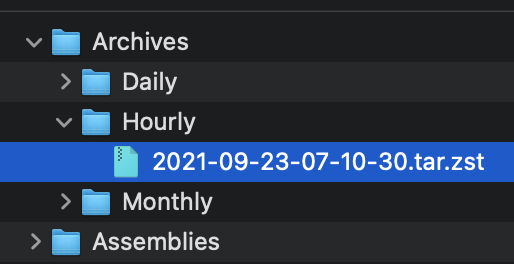
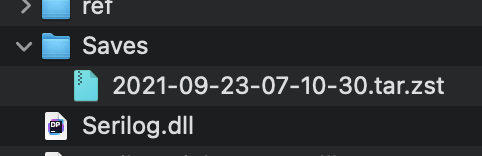
Move the archive to the Saves folder (tar.zst file). On startup the server will extract the file and restore the latest save. See pictures below.

### Manually extracting an archives
#### Windows
* Use the latest version of [7-zip w/ ZStandard](https://github.com/mcmilk/7-Zip-zstd/releases/latest)
  1. Extract the `.tar.zst` file.
  2. Extract the `.tar` file. (Yes you have to do it in two steps)
* On Windows 10 you can use the command line. `zstd.exe` is in the Assemblies folder after building ModernUO.
  1. `tar --use-compress-program "Distribution\Assemblies\zstd.exe -d" -xvf "Archives\Hourly\archivefile.tar.zst" -C "path to where you want to extract it"`
#### Mac
* Install [Keka](https://www.keka.io)
  1. Drop the .tar.zst onto the keka interface.
#### Linux
  1. Install zstd from a package manager
  2. Run `tar -I zstd -xvf "Archives\Hourly\archivefile.tar.zst" -C "path to where you want to extract it"`

### Other changes
* Changes Autosave to occur at the same time no matter when the server is booted.
* Adds `[SaveFrequency <delay> [warning]`command to set save frequency and warning frequency in-game.
* Adds support for time zones that are configurable. The system timezone can also be manually configured. Check `TimeZoneHandler.cs` for details.

<img width="257" alt="Screen Shot 2021-09-22 at 11 23 18 PM" src="https://user-images.githubusercontent.com/3953314/134464929-a5bf3cd8-2ef0-4476-a9ad-71d0816a19ac.png">
<img width="241" alt="Screen Shot 2021-09-22 at 11 23 39 PM" src="https://user-images.githubusercontent.com/3953314/134464945-5f6f96dc-3d1e-434d-8256-5c6b3705e786.png">
<img width="836" alt="Screen Shot 2021-09-22 at 11 34 39 PM" src="https://user-images.githubusercontent.com/3953314/134464957-625e57f2-ef47-4ca1-a0a7-cd40c9b6539c.png">
<img width="631" alt="Screen Shot 2021-09-22 at 11 34 50 PM" src="https://user-images.githubusercontent.com/3953314/134464969-b2d65c0d-f8f5-497a-a832-5d805e8e0b22.png">