
5.7 KiB
Mini Compressor





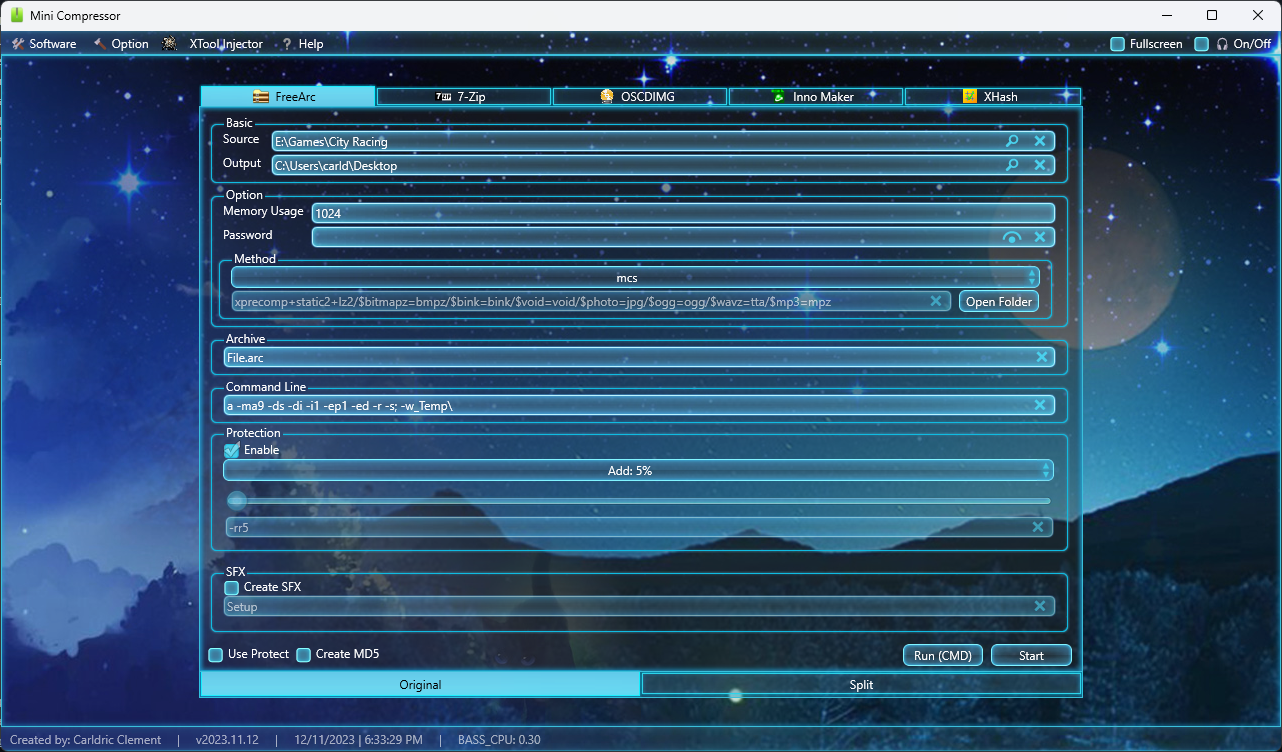
An all-in-one GUI toolset for game repacking, combining FreeArc, SREP, XTool, Oodle preprocessing, and SFX creation into one tool. No command line required.

Quick Start
- Download the latest release from the Releases page
- Extract the archive and run
Launcher.exe - Set your source folder, pick a compression method, and hit Start
⚠️ 64-bit only. 32-bit Windows is not supported.
Download
- Latest: v2026.04.07
- Previous: v2025.12.14
- All versions: Releases page
Compression Methods
| Method | Description |
|---|---|
Masked |
Best ratio. Runs the full precompression pipeline, slow but thorough. |
Standard |
Faster processing with lighter settings. |
Custom |
Manual control over preprocessors, SREP flags, and FreeArc settings. |
For game-specific method configs, see the FileForums installer guide.
Features
- Masked Compression v3.0
- Oodle version switcher (v3-v9), auto-swaps
oo2coreDLL for Unreal Engine games - Self-extracting archives (SFX) with custom music and wallpaper
- Built-in auto-updater (
Help → Check for Updates) - Multi-threaded CPU processing
- Game File Scanner for engine detection
- Directory Slicer and DiskSpan support
System Requirements
Minimum
- 4 GB RAM
- 500 MB free storage
- Windows 7 / 8 / 8.1 / 10 (64-bit)
Recommended
- 8 GB+ RAM
- 3 GB+ free storage
- Windows 10 / 11 (64-bit)
Screenshot
Important Notes
- ❌ Do NOT use DiskSpan with Masked Compression. This will corrupt your output files.
- 💡 PDB files (debug symbols): Use SREP filters for best results
- 🖼 PNG files: Already compressed, avoid heavy methods on them
- 🎮 Oodle games: Set the correct
oo2coreversion underOptions → Oodle Versionbefore compressing
FAQ
A compressor failed. What do I do?
Take a screenshot of the error and back up your data. Try a different method. Errors usually come from the tools themselves, not MiniCompressor.
Why can't I use DiskSpan with Masked Compression?
DiskSpan splits files while Masked modifies data streams. Used together they cause corruption. Use one or the other.
How do I pick the right Oodle version for my game?
Check the game folder for oo2core_X_win64.dll. The number in the filename is your version. Set it under Options → Oodle Version.
Is it free?
Yes, completely free and open source under GPL-3.0.
How do I update?
Help → Check for Updates, or grab the latest from the Releases page.
Resources
Credits
Audio
- BASS Library 2.4.17 · basshls 2.4.3 · bassopus 2.4.2
Compression
- 7-Zip (Igor Pavlov, Shelwien)
- FreeArc, SREP, FAZip (Bulat Ziganshin)
- ISDONE, LOLZ, UELR, MSC (ProFrager)
- lzturbo (Hamid Buzidi)
- ZTool, pZLib, XTool (Razor12911)
- Precomp (Christian Schneider)
- NanoZip (Sami Runsas)
- UHARC (Uwe Herklotz)
- ZCM (Nania Francesco Antonio)
- BSC-M03 (Ilya Grebnov)
- HALAC (Hakan Abbas)
- Masked Compression (panker1992)
Tools & Packaging
- Anvil Forge Recompressor · Razor Archiver · CSArc · SQUID Demo · DiskSpan · ECM · Graphics Studio · Game File Scanner · Directory Slicer · Self-Extract · hkSFV · SafeCopy · Installer Creator · PMT · lrzip · AllDup · Metro UI · XHash Library · CmdOut · Universal CLS
- Inno Setup · OSCDIMG · WinRAR
Thanks to the entire repack community ❤️
Contributors
Leave a ⭐ if this tool has been useful to you!
Special thanks to KillswitchYT for README improvements.
Disclaimer
Use at your own risk. Always back up your files before compressing. Verify archives before deleting originals. Not responsible for data loss or EULA violations.
Made by CarldricGaming and the community